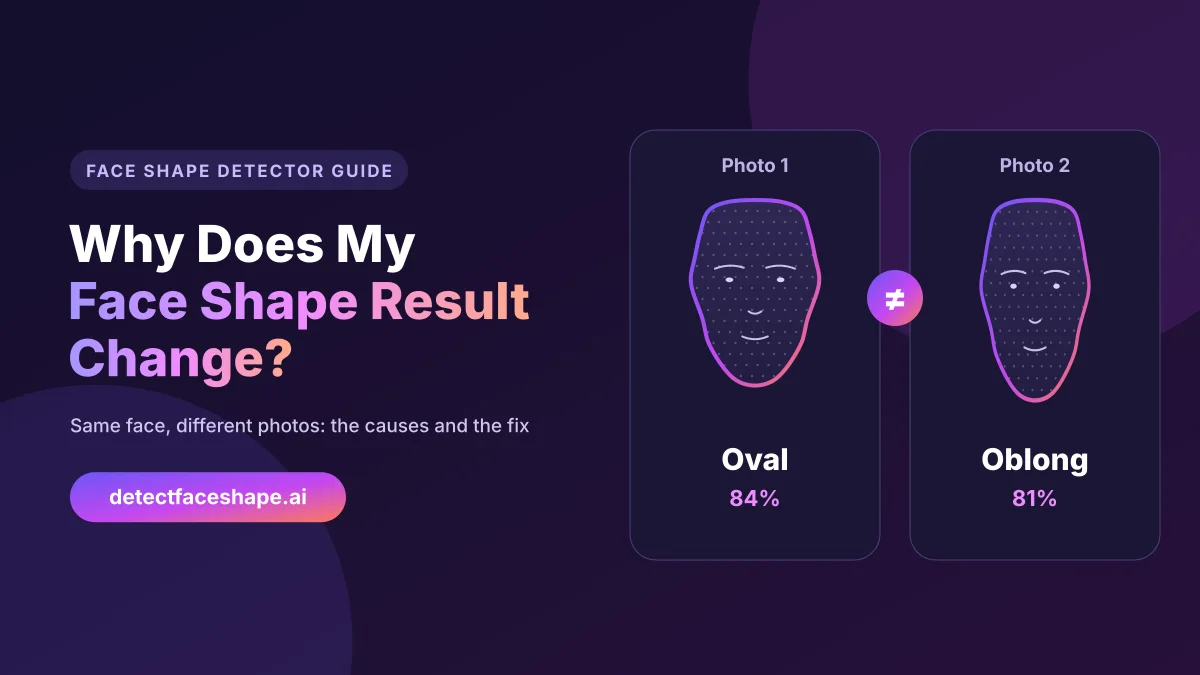
You upload a selfie and get Oval. Then you try another photo a minute later, and suddenly the result says Oblong. So which one is right, and why does your face shape result change at all? The good news is that nothing is wrong with your face, and usually nothing is wrong with the tool either. In this guide, you will learn what really changes between photos, which causes matter most, when your face shape can actually change, and a simple routine that gives you one answer you can trust.
Your face did not change, the photo did
A face shape detector does not look at your face the way a friend does. Instead, it measures a flat photo of a 3D face. It finds your forehead, cheekbones, jaw and face length, then compares the ratios between them. For example, an oval face is about 1.5 times longer than it is wide, while an oblong face is a little longer still.
That is the key point. The line between two shapes often comes down to a few percent. Anything that stretches, squashes or hides part of your face in the photo can move you across that line. As a result, two photos taken a minute apart can give you two different shapes, even though your bone structure stayed exactly the same.
In practice, six things cause almost every change: camera distance, head tilt, expression, hair, lighting and filters. On top of that, some faces simply sit between two shapes. Let’s look at each cause, starting with the biggest one.
Camera distance: the biggest cause
Phone cameras use wide-angle lenses. When you hold the phone close, the parts of your face nearest the lens, such as your nose and the middle of your face, look bigger. Meanwhile, the parts farther away, such as your cheeks, ears and jaw corners, look smaller. This effect is called selfie lens distortion, and it makes your face look longer and narrower than it really is.
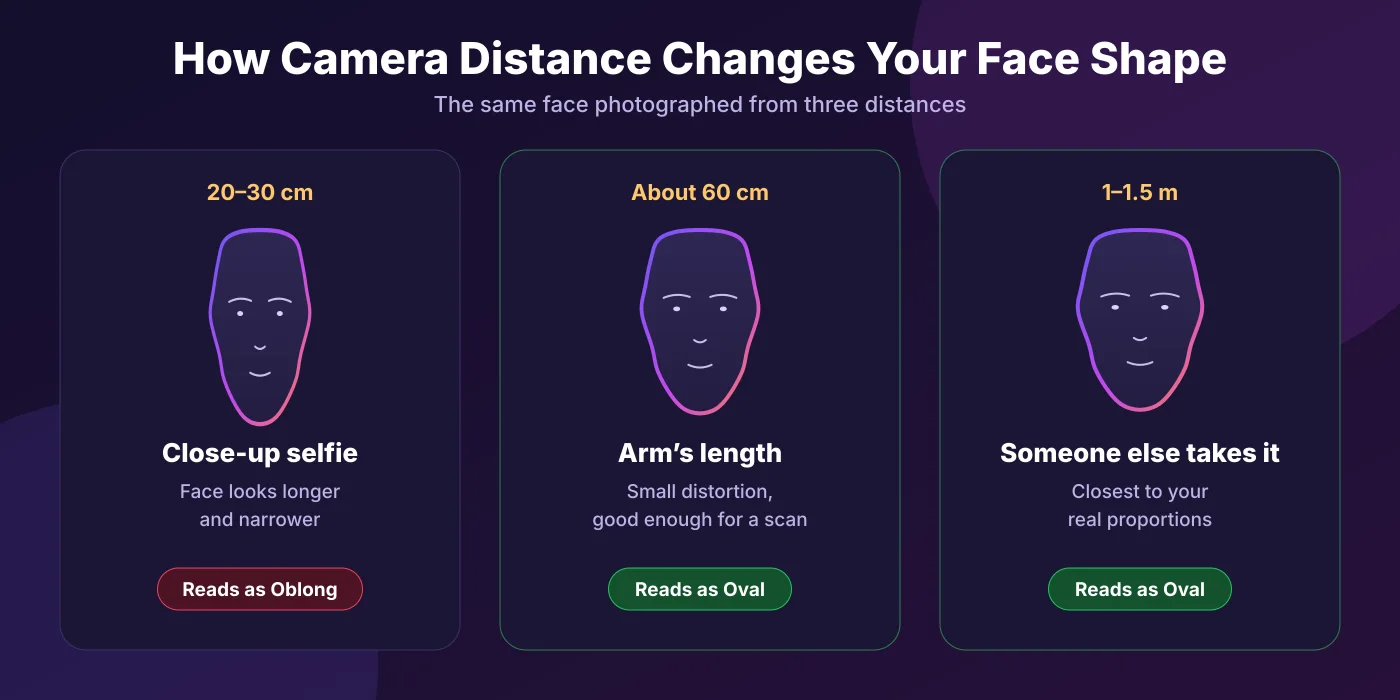
Because of that, a close-up selfie often pushes the result toward a longer shape, like Oblong or Rectangle. A photo from farther away, on the other hand, shows your real width. For that reason, hold the phone at arm’s length at least. Better still, ask someone to take the photo from about 1 to 1.5 metres away and zoom in a little.
The front camera also matters for another reason. Many phones turn on a beauty or portrait mode by default, which can slim the jaw without you noticing. So check your camera settings before every scan.
Head tilt and turn
Head angle comes second. When you lift your chin, your jaw takes up more of the photo while your forehead shrinks, so your face looks shorter and wider. When you drop your chin, the opposite happens: your forehead looks bigger and your jaw and chin look narrower.
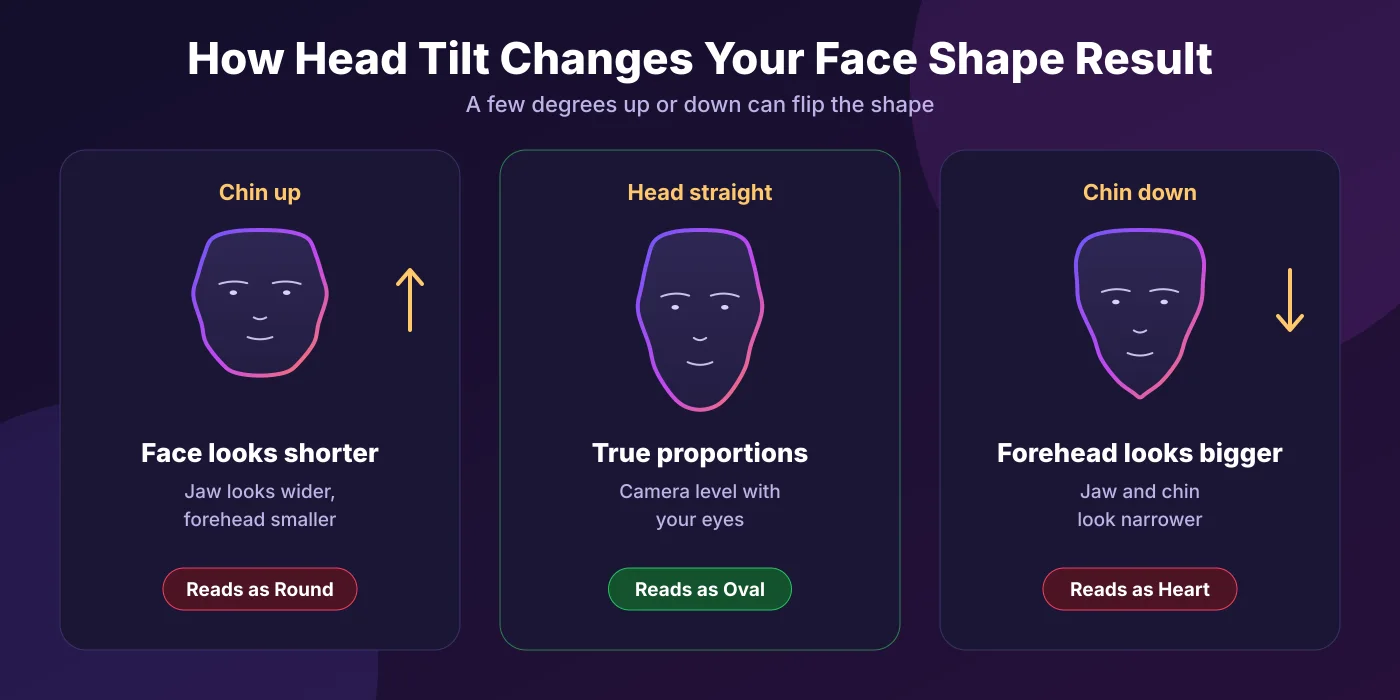
In other words, the same oval face can read as Round with the chin up and as Heart with the chin down. Turning your head to one side causes a similar problem, because it hides one cheek and makes your face look narrower. Most people tilt their head without noticing, especially when they hold the phone above eye level. To avoid this, keep the camera level with your eyes and look straight into the lens.
Expression, hair, light and filters
Expression
A big smile lifts your cheeks and widens the lower half of your face. As a result, a smiling photo can push you toward Round or Square. A neutral face with your mouth closed and your jaw relaxed gives the most stable result.
Hair
Bangs, a side part or loose hair can hide your hairline and the sides of your forehead. Since forehead width and face length are two of the four key measurements, hidden hair changes the result more than most people expect. So pull your hair back for every scan.
Lighting
Strong light from one side throws a shadow across your face. The detector then struggles to see where your jaw or cheek ends, and that side can look narrower. Soft, even light from the front, such as a window in daylight, solves this.
Glasses and beards
Thick frames can cover your brow line, while a full beard can make a rounded jaw look square. Take your glasses off for the scan. If you have a beard, remember that the detector measures what it sees, so your result may differ with and without it.
Filters
Beauty filters slim the face, sharpen the jaw and sometimes even reshape the eyes. Once a filter changes your face, the detector measures the filter instead of you. For this reason, always use a plain, unedited photo.
You may sit between two face shapes
Even with a perfect photo routine, some faces keep switching between two results. Usually, that simply means your face sits between two shapes. Real faces rarely match a textbook shape perfectly, and many people fall between Oval and Oblong, Round and Square, or Heart and Diamond.
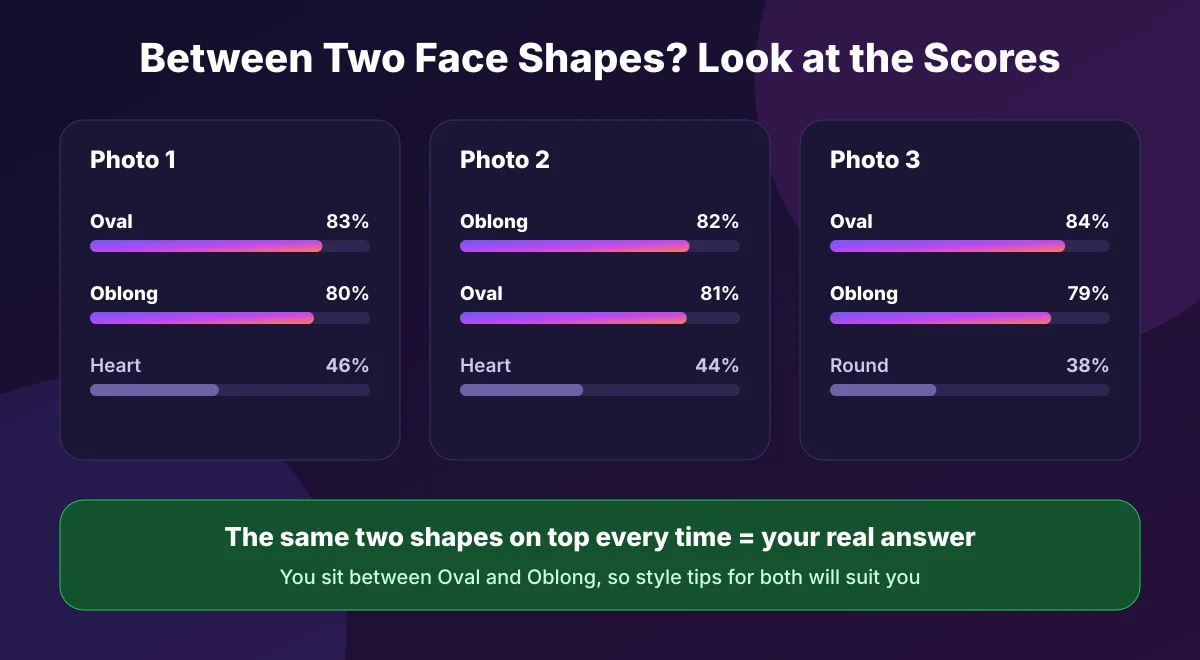
In that case, the scores tell the real story. If the same two shapes always come out on top with close scores, the detector is working correctly; it is just telling you that you are a mix of both. That is actually a useful answer, because you can borrow style tips from both shapes. Our face shape chart shows all eight shapes side by side, so you can compare your two closest matches.
Similarly, different tools can give you different answers for the same photo. Each one draws the lines between shapes slightly differently, and some only show a single label. For a closer look at what makes one tool more reliable than another, read our guide on how accurate AI face shape detectors are.
Can your face shape actually change?
Sometimes the change is real, although it happens slowly. Here is what can genuinely shift your face shape over time:
- Weight: Gaining or losing weight changes the fat in your cheeks and under your jaw. So a round face can look more oval after weight loss, and the reverse can happen too.
- Age: Over the years, faces lose volume in the cheeks and skin loses firmness. As a result, many faces look longer and more angular with age.
- Puffiness: Salt, alcohol, poor sleep and allergies can cause mild swelling, especially in the morning. That puffiness usually fades within a few hours, but it can widen your face in an early photo.
- Dental and medical changes: Braces, jaw surgery or dental work can change your jawline over months.
However, none of these changes happens between two photos taken a minute apart. If your result changes from one selfie to the next, the photo is the cause, not your face. On the other hand, if your result changed after a year or a big weight change, it is worth scanning again.
How to get a consistent face shape result
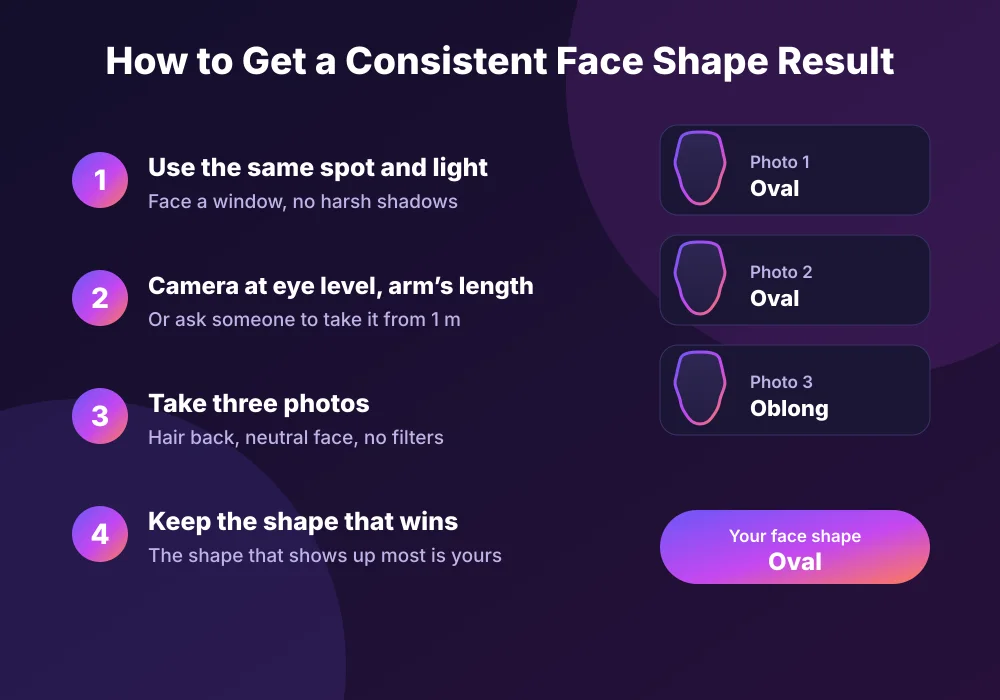
The fix is simple: keep everything the same, then let the most common result win. Follow these steps for a reliable face shape test.
Pick one spot and one light
Stand facing a window in daylight, so both sides of your face get the same light.
Set the camera at eye level
Hold the phone straight in front of your eyes, not above or below them.
Step back
Hold the phone at arm’s length, or ask someone to take the photo from about 1 metre away.
Prepare your face
Pull your hair back, take off your glasses, close your mouth and relax your face.
Turn off filters
Switch off beauty mode and portrait effects before you take the photo.
Take three photos and compare
Scan all three. The shape that comes up most often is your face shape, and the runner-up shows your closest second shape.
Which result should you trust?
When your photos still disagree, use these simple rules:
- Trust the best photo, not the latest one. A straight, well-lit photo from arm’s length beats a quick close-up selfie every time.
- Trust the shape that repeats. If two out of three photos say Oval, you are most likely Oval.
- Trust the pair, not just the label. If the same two shapes keep swapping places, you sit between them, so use tips for both.
- Use a tape measure as a tiebreaker. Measure your forehead, cheekbones, jaw and face length by hand. Our guide What Is My Face Shape? shows you exactly how.
Face Shape Result Changes: FAQs
Why do I get a different face shape every time?
Usually, the photo changes rather than your face. Camera distance, head tilt, a smile, hair over your forehead, uneven light or a filter can all shift the measurements. If your face also sits between two shapes, even a small shift flips the result.
Do selfies make your face look longer?
Yes, close-up selfies often do. Wide-angle phone lenses enlarge the middle of your face and shrink the sides, so your face looks longer and narrower. Holding the phone at arm’s length or farther reduces this effect.
Why does my face shape result change with the front camera?
The front camera sits close to your face, which adds lens distortion, and many phones apply beauty or portrait effects to it by default. Both can change your measured face shape. Use the rear camera or turn the effects off.
What if I get two face shapes?
If the same two shapes keep coming up with close scores, you sit between them. That is normal. Treat the higher one as your main shape and use style tips from both.
Can your face shape change with weight?
Yes, to a degree. Weight gain or loss changes the fullness of your cheeks and jaw, so a round face can look more oval after weight loss. Your bone structure, however, stays the same.
Does face shape change with age?
Faces often look longer and more angular with age, because cheeks lose volume and skin loses firmness. So it is worth taking a new face shape test every few years.
How many photos should I use for a face shape test?
Three photos with the same setup work well. Keep the shape that shows up most often, and note the runner-up as your closest second shape.
The bottom line
So, why does your face shape result change between photos? In most cases, camera distance, head tilt, expression, hair, light or a filter changed the photo, not your face. And if the same two shapes keep trading places, you simply sit between them. Keep your setup the same, take three photos and trust the shape that wins. Ready to try it? Follow the routine above and check your result with our free Face Shape Detector.